2016 Thanksgiving Crazy Coupon: 50% OFF BD/DVD Ripper

2016 Thanksgiving Day is coming. Some of you are probably planning the Thanksgiving menus for your family while some are ready for selecting the best Thanksgiving present for their parents. With great blessing and best wishes, Pavtube Studio also prepared a big gift for their consumer – Thanksgiving Promotion 2016 to celebrate Thanksgiving Day with our friends. Focusing on product quality and customer needs, Pavtube offers up to 50% discount for hot products to reward our customers. Now,let's see the promotion in detail.

Pavtube 2016 Thanksgiving Day Promotion

Index of Pavtube 2016 Thanksgiving Day Promotional Notices

BD/DVD/Video Package Tools | 50% off Video Tools | Bundle Software Big Deal

Pavtube Promote BD/DVD/Video Package Tools in 2016 Thanksgiving Day


  Pavtube Video Converter Ultimate for Windows /Mac Pavtube DVD Video Converter Ultimate Pavtube BDMagic for Windows /Mac Pavtube DVDAid for Windows /Mac
Discount
HomePage
Reviews
How To
Guides
Purchase

Pavtube 50% off Video Tools in 2016 Thanksgiving Day


Pavtube MXF MultiMixer

  1. Preserve MXF multi tracks and channels
  2. Export MXF to MKV/MOV/MP4 with multi tracks
  3. Transcode MXF for Non-linear Editing Software
  4. Trim/Crop/Merge/Watermark/Deinterlace MXF video
Original Price: $45

Now: $22.5

Free Trial | Buy Now

Pavtube Media Magician for Windows /Mac

  1. Import/Backup/Manage camcorder video
  2. Lossless output AVCHD MTS to MTS or MKV
  3. Frame by frame edit Video on timeline
  4. Output Different formats from same source
  5. Directly Upload Video to YouTube
Original Price: $45

Now: $22.5

Buy Windows | Buy Mac

Pavtube MKV Converter for Windows / Mac

  1. Convert MKV with desired subtitle and tracks
  2. Bundled streaming server app
  3. Ouput MKV to popular video and audio formats
  4. Split/Merge/Crop/Watermark MKV
  5. 6X faster conversion speed
Original Price: $29

Now: $14.5

Buy Windows | Buy Mac

Pavtube FLV/F4V Converter for Windows / Mac

  1. Convert FLV/F4V for Device playback
  2. Design FLV/F4V video with editing tools
  3. Bundled streaming server app
  4. Perfect video audio sync technology
  5. 6X faster conversion speed
Original Price: $29

Now: $14.5

Buy Windows | Buy Mac

Pavtube 2016 Thanksgiving Day Promotion Software Bundles


ByteCopy + Video Converter Ultimate

Original Price: $107

Now: $79.9

Video Converter Ultimate + ChewTune

Original Price: $94

Now: $74.9

ByteCopy + ChewTune

Original Price: $71

Now: $54.9

Video Converter Ultimate + DVD Creator

Original Price: $100

Now: $64.9

BDMagic + DVD Creator

Original Price: $84

Now: $49.9

ByteCopy + DVD Creator

Original Price: $77

Now: $44.9

Pavtube 2016 Thanksgiving Video Software Promotion Bundles


MXF Video Converter for Mac + MTS/M2TS Converter for Mac

Original Price: $58

Now: $29.9


Pavtube iMixMXF + HD Video Converter for Mac

Original Price: $80

Now: $54.9


Play 3D Blu-ray on Samsung 3D TV via USB

Summary: A smart Samsung TV like Samsung LED, LCD, and 3D Smart TV is a big entertainment in our daily life. 

Samsung 3D TVs offer multiple connectors for attaching peripheral devices, such as Blu-ray players. For optimal quality, you should use an HDMI connection, but the Samsung 3D TV additionally supports 1080p video quality through three-video-channel component AV cables. (Read Top HDTVs Review

As a big fan of 3D Blu-rays, you may prefer enjoying the extraordinary Blu-ray-level video quality and the nakedness-eye 3D effect at the same time and even have bought all the latest hot 3D Blu-ray movies, like Captain America: The Winter Soldier, The Amazing Spider-Man 2, X-Men: Days of Future Past, Edge of Tomorrow, Transformers: Age of Extinction, etc. Isn’t it nice to getting all of them onto your 3D Samsung TV for enjoying on large display with original vivid 3D effects retained?


Nonetheless, a question is sure to wrap around them is – how to make a 3D Samsung TV to accept your 3D Blu-ray content? Luckily, now I find the easy workflow and work it out. And I will share my experience in the following paragraph.

What you need:
 
  • A 3D Capable Samsung TV
  • A pair of 3D glasses
  • A USB
  • Blu-ray drive
  • 3D Blu-ray discs
  • 3D Blu-ray Ripper
I realized there’s are lots of Blu-ray converting tools on the marketplace, but one of them that I tested before could make a video with 3D effect that can be playback on 3D Samsung TV, till I meet this 3D Blu-ray Ripper from Pavtube. Overall, this programs help users backup, convert 3D Blu-ray or common 2D Blu-rays/DVDs to 2D/3D videos so that we can watch smoothly. It integrates many presets that sorted by device models, which makes the conversion very easy to get started. If you choose 3D video for output, the converted videos may not be exactly the same as your original 3D blu-ray disc, but it do not influence the watching effect.

Get the Mac version here: 3D Blu-ray Ripper for Mac


Other Download:

- Pavtube old official address: http://www.pavtube.cn/blu-ray-ripper/
- Cnet Download: http://download.cnet.com/Pavtube-BDMagic/3000-7970_4-75922877.html

How to backup hot 3D Blu-ray to 3D Samsung TV for freely playback?

Step 1. Load 3D Blu-ray discsClick the top left disc&folder icon to import videos or blu-ray disc, folder or ISO files. It will also help you to roll off your disc protection as well as region code easily. (Learn how to rip 3D Blu-ray with subtitles)


Step 2. Choose format.


Step 3. Adjust conversion specs and 3D effect (Optional)

Click “Settings” to enter the Profile Settings window; you can free change video size according to your device resolution, bitrate (turn it down if you want to videos in smaller file size) and frame rate. You can also change 3D depth on the bottom.Step 4. Start conversion.

Now back to the main interface and hit “Convert” to start the conversion. Wait for moments till the conversion completed, then click “Open output folder” to quick locate converted SBS 3D MP4 videos for transferring to 3D Samsung TV via USB.

Now play the shocked vidion effects with the hot 3D Blu-ray movies just on your 3D Samsung TV? Come on! Just enjoy!

Related Articles: 
Source: http://samsung-galaxy-video-converter.blogspot.com/2015/11/rip-3d-blu-ray-movies-to-3d.html 

Rip DVD to 3D MP4 for playing on MacOS Sierra

Here is the best solution to convert DVD to SBS 3D MP4 for enjoying the 3D video with the assistant of the 3D DVD Ripper.Maybe most 3D movie fans would ask the same question to either backup their 3D movies free from physical disks or prepare for future usage such as watching copied 3D movies on 3D player. But how to get them playable on these 3D device and if doing converting, is it will surely leaded to the loss of 3D effect? 


"I'm trying to find out if I can rip my 3D DVD's to my HDD and still get 3D playback on them to my TV via my HDMI connection. If so, how exactly would I go about burning them (if there is a certain way), and is there any special software or anything I'll need to play the DVD's back through to do this? I am using MacOS Sierra Mavericks." 

To rip DVD to side-by-side 3D MP4 video, Pavtube ByteCopy for Mac is the best 3D/2D DVD to Side-by-Side ripper to assist you with ripping Blu-ray and DVD to side-by-side 3D MP4 format. It can also output the format with multiple audio tracks and subtitles preserving. Windows users could use Pavtube ByteCopy which is specially designed for Windows users to create 3D SBS MP4 video out of 3D/2D Blu-ray/DVD movies. 

How to rip 2D/3D DVDs to SBS 3D MP4 on MacOS Sierra Mavericks 

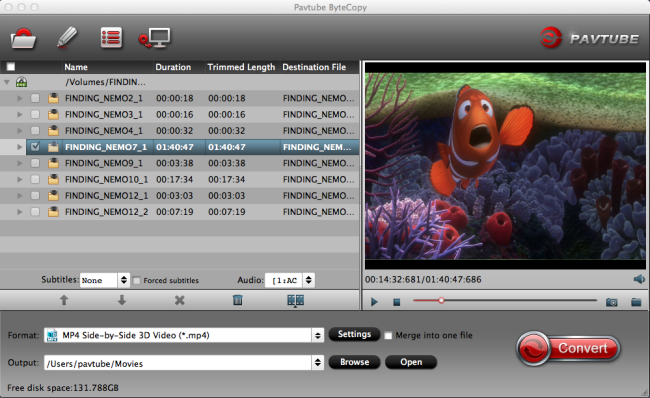
1. Add 3D DVD source file to the program. 

Download and install the latest MacOS Sierra 3D DVD Ripper onto your computer. Launch it and click "Add Video" icon to load 3D DVD files. 


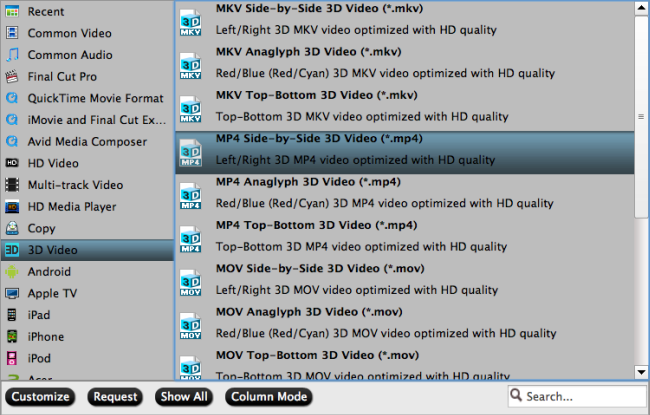
2. Set 3D MP4 format as output

Click "Format" bar and move mouse to "3D Video" column, you can choose "MP4 Side-by-Side 3D Video (*.mp4)" as output format. If you want to output Anaglyph 3D or Top-Bottom 3D, you could choose it according to your specific need. 


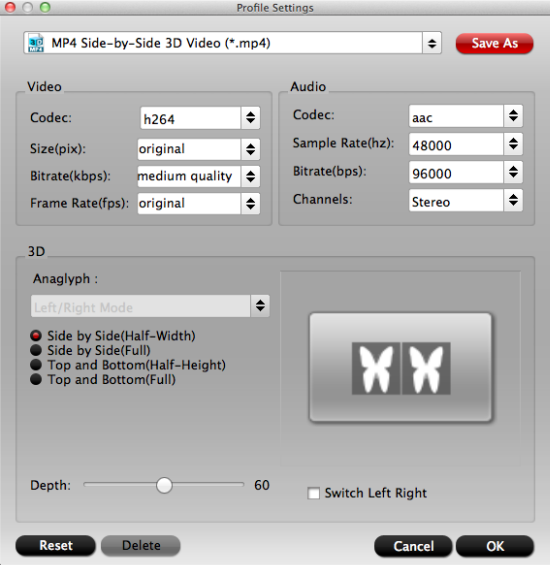
Tip: You can adjust target video settings and 3D effect.

Click “Settings” which is next to “Format”, free change your target video size, bitrate, frame rate and 3D depth. If you want to get best video quality, pls switch them to “original”. 


3. Start rip 3D DVD to SBS MP4 3D

When everything is OK, just press the "Convert" button to start the conversion. It will not take much time. Just wait for the conversion process to get done. Once the conversion finished, you are able to get 3D MP4/MKV/MOV files via clicking "Open" button.

The image below is the Side-by-Side effect when viewing without putting on glass. 


When play the 3D MP4 on your TV, You may find it comes up in two screen, just hit the 3D button on your TV, and it will pop up a window saying put on your glasses, choose "OK". Another window appears showing your 3D choice: Side-by-Side. Put on your 3D glasses, and then just enjoy 3D Movies! 

Top 3D Video Converters On EL Capitan

Summary: Here we picked the three of the best 3D Video Converter apps for Mac OS X 10.11.1/10.11.2, each of which sits at a different complexity and skill levels.

Have you ever dreamed of watching 3D movies at home? Now 3D video converter makes your dream come true. Fast and easy to use, 3D video converter is an excellent tool which enables you to convert 2D videos to 3D videos, switch the modes among 3D videos as well as converting 3D videos to 2D videos.  

Top 3 3D Video Converters on Mac OS X El Capitan 10.11.1/1011.2 

#1. Pavtube iMedia Converter for Mac El Capitan 


Features: 

> Convert 2D BD/DVD to 3D video 

Easily create 3D movies from 2D Blu-ray/DVD with abundant 3D effects: Side by Side, Anaglyph, Top/Bottom. 

> 3D Blu-ray to 3D Conversion 

Convert 3D Blu-ray to 3D MKV, 3D MP4, 3D AVI, 3D WMV, etc. for various 3D TV and players. The 3D Depth of output 3D movies could be adjusted from 20 to 100 for more vivid 3D effect. 

> Convert standard video to 3D video 

Capable of converting 2D videos to five types of 3D videos including Anaglyph(Red/Cyan), Side by Side, Side by Side (half-width), Top and Bottom, and Top and Bottom (half-height). 

> Switch among 3D videos 

Convert among different types of 3D video. 

> Convert 3D video to 2D video 

Support the conversion from Side by Side, Side by Side (half-width), Top and Bottom, and Top and Bottom (half-height) 3D video to almost any format of standard 2D video. 

Support Input Files: 

BD/DVD: 3D Blu-ray movies, 2D Blu-ray movies, Blu-ray Folder, Blu-ray ISO Image File, DVD movies, DVD Folder, DVD IFO File, DVD ISO Image File 

Video files: H.264, MP4, MOV, MKV, VOB, WMV, MPG, Tivo, AVI, Divx, M4V, QT, FLV, F4V, ASF, 3GP, TS, MTS, M2TS, TP, TRP, MOV, MOD, TOD, MXF(partial), DV, M2V, 3G2, RM, RMVB, DAT, NUT, NSV, etc. 

Audio files: M4A, WMA, WAV, MP3, MP2, AU, FLAC, MKA, AAC, OGG, Aiff, Ra, Ram, DTS, etc. 

#2. 4Videosoft 3D Converter for Mac 


Features: 

> 2D to 3D conversion 

Convert any popular general 2D video including SD video and HD video in the formats like MP4, AVI, 3GP, WMV, MOV, VOB, MPEG, MTS, MKV, etc. to vivid 3D movies. 

> Convert 3D videos to general 2D video 

If you want to watch the 3D movies on your player that doesn't support 3D videos, you can add the selected 3D video to this 3D Converter for Mac then converted to the general 2D videos supported by your player. 

> 3D to 3D Converter 

It can help you freely convert between different 3D modes, such as convert between Side by Side (Half-Width/Full), Top and Bottom (Half-Height/Full) and Anaglyph. 

Support Input Files: 

Video: MPG, MPEG, MPEG2, MPEG4, DivX, XviD, VOB, DAT, MP4, M4V, TP, TRP, TS, MTS, M2TS, RM, RMVB, WMV, ASF, MKV, AVI, 3GP, 3G2, FLV, F4V, SWF, MPV, MOV, MOD, TOD, QT, DV, DIF, MJPG, MJPEG, WebM 

HD Video: MTS, TS, M2TS, MPG, MPEG, MP4, WMV, QuickTime HD MOV 

#3. Xilisoft 3D Video Converter for Mac 


Features: 

> Convert 2D to 3D Video 

Convert any popular format of video to Anaglyph, Side by Side, Side by Side (half-width), Top and Bottom, or Top and Bottom (half-height) 3D video on your Mac. 

> Convert 3D video to standard 2D video 

Convert Side by Side, Side by Side (half-width), Top and Bottom or Top and Bottom (half-height) 3D video to 2D video. 

> Convert among 3D videos 

Convert one type of 3D video to another type. 

Support Input Files: 

Video: AVI, MPEG, WMV, MP4, AVCHD Video (*.mts, *.m2ts), H.264/MPEG-4 AVC (*.mp4), MPEG2 HD Video (*.mpg; *.mpeg), MPEG-4 TS HD Video (*.ts). 


Related Articles: 

Source:http://2d-3d-movie-tips.blogspot.com/2016/01/top-3d-video-converters-on-el-capitan.html 

Halloween Coupons - 40% OFF Pavtube DVD Ripper

2016 Halloween is coming. Some of you probably have picked your ideal Halloween costumes. With great blessing and best wishes, Pavtube Studio also prepared a big gift for their consumer - Halloween Promotion 2016 to celebrate Halloween with our friends. Focusing on product quality and customer needs, Pavtube offers up to 40% discount for hot products to reward our customers. 


Halloween always comes with movies. I believe you must have prepared some Halloween DVD movies for enjoy with your family and friends. With this wish, how can you bear the incompatibility issue when playing Halloween DVD movies on your HD TV, iPad, 4K Projector, etc. To avoid the embarrassing situation, you'd better rip the DVD movies to your multimedia players with most compatible format and specs by using 
Pavtube DVDAid for Windows / Mac. (Support Windows 10 and 10.12 macOS Sierra

Pavtube DVDAid provides the best solution to rip any commercial and region-locked DVD and convert DVD to video and audio in popular file formats for many devices. Along with multiple practical bonus features like video editor, DVDAid is capable of improving your DVD movie experience without location or time limitations. It could backup DVD and convert DVD to various video and audio formats including m3u8, H.265/H.264 MP4, MKV, MOV, AVI, WMV, MP3, AAC to let you enjoy DVD movies on any mobile device like iPhone 7, iPhone 7 Plus, iPad Air 3, iPad Mini 3, Galaxy S7, Galaxy S7 Edge, Kindle Fire HDX, PS4 Pro, Surface, Xbox One S

Once you have a Pavtube DVDAid in hand, you will enjoy the service of life-long technical support and update in time to compatible with any Win/Mac system upgrade. Catch this opportunity and enjoy the best video production experience with the least money in Pavtube. 

You won't get a DVD Software at such low price in normal days. So if you have a plan to purchase a DVD Converter in the near future, why not push the schedule forward and get it in Pavtube Halloween Promotion activity. 

Download and install Pavtube DVDAid: 


Download and install Pavtube DVDAid for Mac: 


Pavtube Video Converter Ultimate

Summary: Pavtube Studio offers 20% off discount at its top-selling Pavtube Video Converter Ultimate to celebrate 2016 Halloween.


Festivals are always the best opportunities to purchase the goods you were not willing to buy or had no ability to afford in the past days. 2016 Halloween is coming. Are you ready to open your wallet To make your Halloween celebration even greater, Pavtube Studio has prepared a great Halloween Promotion, offering you a generous 20% Discount on the top-ranked Blu-ray/DVD/Video Tool.


Pavtube 2016 Halloween Promo


This top BD/DVD/Video tool is Pavtube Video Converter Ultimate, world NO.1 video converter ultimate. With its help, you can avoid many video editing and playback issues.


What Aspects Can Pavtube Video Converter Ultimate Help You?


This program helps you convert your Halloween footages to iMovie, FCP, Premiere Pro CC, etc to edit.


Pavtube Video Converter Ultimate rips DVD/Blu-ray Halloween movies to Apple TV 4, iPad Pro, Surface Pro 4, PS4 Pro, Xbox One S, etc with the most compatible format and original video quality.


This Software can convert your downloaded Halloween videos to MP4, MKV, AVI, WMV, MOV, ProRes and any other video and audio formats as your need.


You even can trim a video footage from Halloween movies with the software to add your own Halloween recordings.


Want to create your own Halloween horrible film OK. Pavtube Video Converter Ultimate allows you to split video and merge video then add external SRT/ASS/SSA subtitles to your video. You also can replace/mute audio from video.


If you want to know more the function of Pavtube Video Converter Ultimate, just go to visit Pavtube Studio Official Site.

Once you have Pavtube product in hand, you will enjoy the service of life-long technical support and update in time to compatible with any Windows system upgrade. Catch this opportunity and enjoy the best video production experience with the least money in Pavtube.


Free download and install


Expire Date: November 12